This post contains affiliate links, and Amazon associate links which means I may earn a commission at no extra cost to you if you buy through them, and it may also include links to my own paid digital products. I use AI tools to help with drafting and editing; however, every post is reviewed, fact-checked, and approved by me before publication, and all client results and numbers are real.
You’re staring at your Pinterest Analytics dashboard, watching impressions climb, and it feels like progress.
Thousands of eyeballs. Tens of thousands, even. The graph is going up and to the right, and something about that feels validating.
Then you check your website traffic. Your email sign-ups. Your sales. And none of those lines match.
That gap between “people saw my Pin” and “people actually clicked through” is exactly where your Pinterest click through rate lives. It’s the metric most Pinterest marketers gloss over because impressions feel bigger, more impressive, easier to screenshot for a client report.
But impressions don’t put revenue in your business. Clicks do.
Your Pinterest click through rate is the bridge between visibility and results. And understanding what a good CTR looks like, how yours compares, and what to do about it is the difference between a Pinterest account that looks busy and one that actually drives your business forward.
What Is Pinterest Click Through Rate (and Why It Matters More Than Impressions)
Pinterest click through rate measures the percentage of people who see your Pin and then click through to your website, landing page, or product listing. It tells you whether your content is compelling enough to move someone from browsing to taking action. While impressions show reach, CTR reveals the quality of that reach, and quality is what converts into email subscribers, booked calls, and sales.
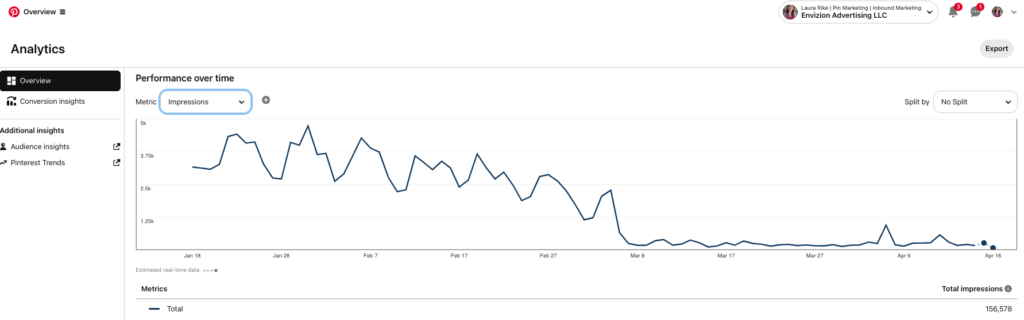
A Pin with 50,000 impressions and a 0.1% CTR sends 50 people to your site. A Pin with 10,000 impressions and a 1.5% CTR sends 150. The second Pin did more for your business with a fraction of the visibility.
That’s why CTR deserves a permanent seat at the table when you’re reviewing your Pinterest content strategy.
How to Calculate Your Pinterest click through rate
The formula is simple. Take the total number of outbound clicks (clicks that send someone to your destination URL) and divide that by the total number of impressions. Multiply by 100.
Pinterest CTR = (Outbound Clicks ÷ Impressions) × 100
If your Pin received 8,000 impressions and 120 outbound clicks, your CTR is 1.5%. That’s a strong number for organic Pinterest content.
One note here: Pinterest reports both “Pin clicks” (which include clicks to expand the Pin within Pinterest) and “outbound clicks” (which send users to your website). Always use outbound clicks when calculating your true CTR. Pin clicks inflate the number because they count people who tapped on the Pin but never left Pinterest.
Where to Find Pinterest click through rate in Pinterest Analytics
Inside your Pinterest Business account, navigate to Analytics > Overview. You’ll see impressions, engagements, Pin clicks, and outbound clicks. Pinterest doesn’t display CTR as its own metric in the dashboard, so you’ll need to calculate it manually or export your data.
For a more granular view, go to Analytics > Top Pins and filter by outbound clicks. This shows you which individual Pins are driving the most traffic, and you can calculate CTR for each one.
If you’re running Pinterest Ads, your Ads Manager dashboard does display CTR directly in the campaign reporting columns. You can filter by campaign, ad group, or individual Pin to compare performance across your paid content.
What Is a Good Pinterest Click Through Rate?
A good Pinterest click-through rate falls between 1% and 1.5% for organic content, though this varies by industry and pin format. The platform-wide average sits closer to 0.2% to 0.5%, which means most Pinterest accounts have significant room to improve. Reaching 1%+ consistently signals that your content, keywords, and visuals are aligned with what your audience is actually searching for.
Here’s the context that matters: Pinterest operates as a visual search engine, and user behavior is fundamentally different from social feeds. Someone typing “minimalist living room ideas” into Pinterest is actively looking for solutions. That intent means the clicks you do get tend to be higher quality than clicks from platforms where users are passively scrolling.
So while a 1% CTR might sound modest compared to Google Search Ads (which average nearly 5%), those Pinterest clicks represent users who chose your content from a curated set of results. They’re pre-qualified by their own search behavior.
Pinterest click through rate by Business Type
Ecommerce and product-based businesses tend to see CTRs in the 0.8% to 2% range for organic Pins, especially when using optimized product Pins with pricing and availability data. Products with strong visual appeal (home decor, fashion, beauty, food) naturally attract more clicks because Pinterest users are often in discovery-to-purchase mode.
Service providers and coaches typically land between 0.5% and 1.5%. The key variable here is whether your Pin connects to a specific, valuable piece of content. A Pin linking to a detailed blog post about a problem your ideal client is actively searching for will outperform a generic brand awareness Pin every time.
Bloggers and content creators see the widest range, from 0.3% to 2%+, depending almost entirely on keyword alignment. Bloggers who treat Pinterest as a search engine (optimizing titles, descriptions, and boards around specific keywords) dramatically outperform those who treat it like another social channel.
Food and recipe creators often see some of the highest CTRs on the platform, ranging from 1% to 3%+. Recipe content performs exceptionally well because the search intent is crystal clear and the Pin format (ingredient lists, step-by-step visuals) naturally drives clicks to the full recipe.
Organic Pinterest click through rate vs Pinterest Ads click through rate
Organic and paid Pinterest CTR benchmarks tell very different stories.
For organic Pins, a CTR of 1% or above is strong. The platform-wide organic average hovers around 0.2% to 0.5%, so anything above that puts you ahead of the curve. Organic CTR compounds over time as Pinterest indexes your content and serves it to relevant searches for months or even years.
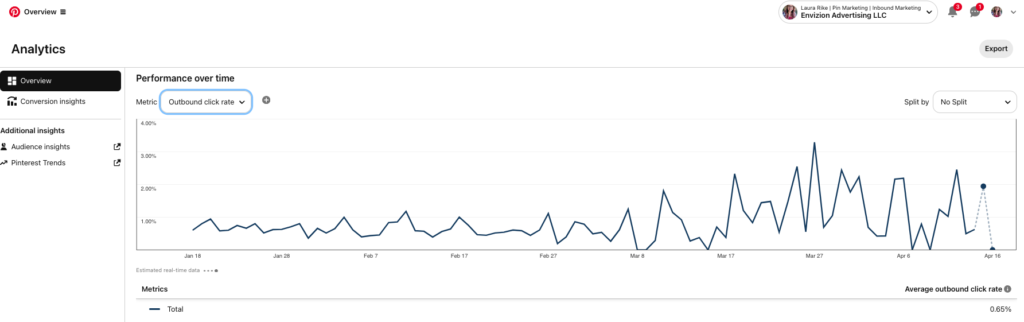
For **Pinterest Ads**, the average CTR sits around 0.28%, with anything above 0.55% considered above average. A CTR between 0.6% and 1.5% is a sign that your ad creative, targeting, and messaging are working well together. If you’re curious about what to invest in paid Pinterest, this breakdown of Pinterest ad spend is worth reading alongside your CTR data.
The difference between organic and paid CTR makes sense when you consider the context. Organic Pins appear in search results and feeds over time, surfacing when the user’s intent aligns naturally. Ads are placed in front of audiences based on targeting parameters, which means there’s inherently more friction between the user’s current browsing mode and the ad’s message.
Pinterest click through rate vs Other Platforms: How Pinterest Compares
Pinterest click through rate benchmarks sit between Google Ads and Meta when you compare across the major advertising and traffic platforms. Understanding where Pinterest fits helps you set realistic expectations and allocate your marketing budget based on the quality of traffic each platform delivers, not just the volume.
| Platform | Avg CTR (Ads) | Avg CTR (Organic) | Traffic Intent |
| Google Search Ads | 4.9% – 6.1% | N/A (paid only) | Very High |
| 0.28% – 1.5% | 0.2% – 1.5% | High | |
| Facebook/Meta Ads | 0.90% – 1.77% | 0.07% – 0.15% | Low to Medium |
| Instagram Ads | 0.40% – 0.80% | 0.05% – 0.10% | Low |
Why Pinterest click through rate Tells a Different Story Than Meta CTR
Raw CTR numbers only tell part of the story. A click from Pinterest carries different weight than a click from Meta, and it comes down to intent and longevity.
On Meta, most users are scrolling passively. They aren’t looking for your product or content. Your ad or post interrupts their feed, and the click (when it happens) is often impulsive. Meta CTRs can look higher for ads, but the bounce rate on those clicks is also typically higher.
On Pinterest, users are in search and discovery mode. They typed a keyword, browsed results, and chose your Pin. That behavior pattern more closely mirrors Google Search than Instagram Stories. The result is that Pinterest clicks tend to convert at a higher rate even when the raw CTR number is lower.
The other factor is lifespan. A Meta post’s engagement window is 24 to 48 hours. A Pinterest Pin can drive clicks for 6 to 12 months or longer. So a Pin with a “modest” 0.8% CTR that runs for 9 months can deliver more total traffic than a Meta post with a 2% CTR that dies in two days.
When you factor in how the Pinterest ecosystem actually works as a search engine with compounding distribution, the traffic math shifts dramatically in Pinterest’s favor.
Ready to see how your Pinterest analytics compare? Book a free Pinterest strategy chat
What Affects Your Pinterest Click Through Rate?
Several factors influence your Pinterest click through rate, and most of them are within your control. The biggest levers are pin design, keyword alignment, pin format, the strength of your call to action, and how well your landing page delivers on the promise your Pin makes. Optimizing across all five areas is what separates accounts stuck at 0.2% from those consistently hitting 1%+.
Pin Design and Visual Quality
Pinterest is a visual-first platform. The first thing a user sees is the image, and that image has roughly one second to earn the click.
Pins with high-contrast colors, clean text overlays, and strong visual hierarchy consistently outperform cluttered or stock-photo-heavy designs. The optimal aspect ratio is 2:3 (1000 x 1500 pixels), which takes up the most real estate in the feed. Research from Tailwind’s benchmark reports shows that 76% of top-performing Pins use this ratio.
Branded Pins (with your logo, consistent fonts, and a recognizable color palette) also tend to earn more clicks over time because they build visual recognition. When someone has seen and saved your Pin style before, they’re more likely to click the next time it appears.
CTR by Pin Type: Standard vs Video vs Idea Pins
Pin format has a measurable impact on click through rate.
Standard image Pins are the workhorse of Pinterest. They’re the most common format and deliver engagement rates typically between 0.15% and 0.25% when unoptimized, but well-optimized standard Pins regularly break 1%+.
Video Pins generate up to 3x higher CTR than static images when promoted as ads. The movement catches attention in a static feed, and Pinterest’s algorithm tends to give video content priority placement. For organic video, the results vary more because autoplay means a “view” doesn’t always signal intent.
Idea Pins (Pinterest’s multi-page, story-style format) drive the highest engagement rates on the platform, between 0.5% and 1%+. They outperform standard Pins by up to 4x for engagement. The trade-off is that Idea Pins historically haven’t supported outbound links as consistently as standard Pins, so while engagement is high, the clicks may stay within Pinterest rather than driving to your site. Pinterest has been evolving this, so check the current link capabilities when planning your content.
Keywords, Descriptions, and Search Intent
Pinterest is a search engine. Your CTR is directly tied to how well your Pin matches what people are actually typing into that search bar.
A Pin optimized for the keyword “Pinterest click through rate” will surface when someone searches that exact phrase. If your title, description, and image text align with the searcher’s intent, the click becomes natural.
Pin descriptions between 220 and 232 characters tend to perform best, giving you enough space to include your primary keyword, a secondary keyword, and a clear indication of what the user will find when they click.
This is where understanding Pinterest keywords and optimization strategy becomes essential. The better your keyword research, the better your CTR.
Your Landing Page Experience
CTR doesn’t exist in isolation. If your Pin earns the click but your landing page doesn’t deliver, Pinterest’s algorithm notices.
Pinterest tracks user behavior after the click. If users consistently bounce back to Pinterest within seconds, it signals that your content didn’t match the Pin’s promise. Over time, this can reduce your Pin’s distribution.
Make sure the page your Pin links to directly addresses the topic or promise in the Pin. If your Pin says “5 ways to increase Pinterest engagement,” the page should deliver exactly that, above the fold if possible.
Related reading:
- Pinterest CTAs That Convert: How to Turn Scrolls into Sales
- The Pinterest Ecosystem Explained
- Pinterest Ad Spend: How Much Should You Really Be Paying?
- The Power of Pinterest Keywords vs The Strategy of Optimization
How to Increase Your Pinterest Click Through Rate
Improving your Pinterest click through rate requires a systematic approach across your visuals, copy, keywords, and testing cadence. The accounts that maintain CTRs above 1% treat each of these as interconnected systems rather than isolated tactics. Small, consistent optimizations compound in the same way Pinterest traffic does.
Optimize Your Pin Design for Clicks
Start with the 2:3 aspect ratio. Add a clear, readable text overlay that tells the user exactly what they’ll get when they click. Keep your brand colors and fonts consistent so returning users recognize your content instantly.
Test lifestyle images against flat-lay graphics. Test bold colors against muted palettes. The data will tell you what your specific audience responds to, and it varies significantly by niche.
One pattern that holds across industries: Pins with a specific, tangible promise in the text overlay outperform vague or generic headlines. “5 Pinterest CTR Strategies That Doubled Our Client’s Traffic” will outperform “Pinterest Tips” every time.
Write Descriptions That Drive Action
Your Pin description serves two purposes: it helps Pinterest’s algorithm understand what your Pin is about (keywords), and it gives the user a reason to click (persuasion).
Lead with your primary keyword in the first sentence. Follow with a specific benefit or outcome the user will get from clicking. Close with a natural call to action.
Example: “Your Pinterest click through rate tells you whether your Pins are actually working. Inside this guide, you’ll find 2026 CTR benchmarks by industry, a formula to calculate your own, and six strategies to increase clicks starting this week. Save this Pin and read the full breakdown.”
Use Strong Pinterest CTAs
A direct, specific call to action at the end of your Pin description (and in your text overlay) can meaningfully increase CTR. The most effective Pinterest CTAs are action-oriented and tell the user exactly what happens next.
Top-performing CTAs for Pinterest include: “Read the full guide,” “Get the free checklist,” “Shop the collection,” “See all 10 ideas,” and “Save for later.” The key is matching the CTA to the content type and the user’s likely intent.
If you want to go deeper on crafting CTAs that actually convert, this post on Pinterest CTAs covers the full playbook.
Test, Measure, and Iterate
Create multiple Pin designs for your highest-traffic content. Change one variable at a time: the image, the headline, the description, the CTA. Give each version at least 2 to 4 weeks of data before drawing conclusions, because Pinterest’s distribution cycle is slower than Meta’s.
Track your top-performing Pins monthly. Look for patterns in what earns clicks versus what earns impressions. Often, the Pins that go “viral” with impressions aren’t the same ones driving traffic. The Pins quietly generating 50 to 100 outbound clicks per month with strong CTR are usually your most valuable assets.
Want a Pinterest strategy built around the metrics that actually matter? Explore Laura’s Pinterest services
How Many Views Is Considered Viral on Pinterest?
A Pin is generally considered viral on Pinterest when it surpasses 100,000 impressions, though some marketers set the threshold at 500,000 or higher. Virality on Pinterest looks and behaves differently than on platforms like TikTok or Instagram because Pinterest distribution is gradual and search-driven rather than algorithm-spike-driven.
A Pin might accumulate 100,000 impressions over three months as Pinterest continues serving it to relevant searches. That’s a fundamentally different pattern than a TikTok that gets 100,000 views in 48 hours and then disappears.
Here’s the part that matters for your business: viral impressions without clicks are a vanity metric. A Pin with 500,000 impressions and a 0.05% CTR sent 250 people to your site. A Pin with 20,000 impressions and a 2% CTR sent 400.
The Pin with fewer impressions drove more business results. This is why tracking your Pinterest click-through rate alongside impressions gives you a much clearer picture of what’s actually working. When you’re reviewing what’s trending on Pinterest for your niche, look at the outbound click patterns, not just the view counts.
FAQ: Pinterest Click Through Rate
What is the average Pinterest CTR?
The average Pinterest click through rate for organic Pins ranges from 0.2% to 0.5% across the platform. For Pinterest Ads, the average CTR is approximately 0.28%. However, well-optimized accounts with strong keyword alignment and compelling visuals regularly achieve 1% to 1.5% or higher. Your specific benchmark depends on your industry, content quality, and how effectively your Pins match user search intent.
Is 1% CTR good on Pinterest?
Yes, a 1% click through rate on Pinterest is considered strong and above average. The platform-wide average for organic content sits between 0.2% and 0.5%, so a 1% CTR means your content is performing two to five times better than most Pinterest accounts. For Pinterest Ads, a 1% CTR is excellent, well above the 0.28% average. Consistently maintaining 1%+ signals that your visuals, keywords, and messaging are aligned with your audience’s search behavior.
How do I check my Pinterest click through rate?
Pinterest doesn’t display CTR as a standalone metric in the analytics dashboard, so you’ll need to calculate it. Go to Pinterest Analytics > Overview, note your outbound clicks and impressions for a given time period, then divide outbound clicks by impressions and multiply by 100. For Pinterest Ads, CTR is displayed directly in the Ads Manager reporting columns, broken down by campaign, ad group, or individual Pin.
Does Pinterest CTR affect ranking?
Pinterest hasn’t publicly confirmed that CTR directly affects search ranking within the platform, but engagement signals (including clicks, saves, and closeups) influence how widely Pinterest distributes your content. Pins that consistently earn clicks signal to Pinterest’s algorithm that the content is relevant and valuable for the searches it appears in. Over time, high-engagement Pins receive broader distribution, which creates a compounding effect: better CTR leads to more impressions, which leads to more clicks.
What is a good CTR for Pinterest Ads?
A good CTR for Pinterest Ads is 0.55% or above, with top-performing campaigns reaching 1% to 1.5%. The platform average for paid Pins is around 0.28%. Factors that influence ad CTR include creative quality, audience targeting precision, keyword relevance, and how well the ad aligns with the user’s current browsing intent. Video ads tend to generate higher CTRs than static image ads, often by a factor of 2x to 3x.
The Final Pin Drop
Your Pinterest click through rate is the metric that connects the dots between someone seeing your Pin and someone landing on your website ready to take the next step. Impressions tell you that you’re showing up. CTR tells you that what you’re showing up with is resonating.
The benchmarks matter as a starting point: 0.2% to 0.5% is average, 1%+ is strong, and anything above 1.5% means your content, keywords, and visuals are working together at a high level.
But the real value isn’t in the number itself. It’s in what CTR reveals about the alignment between your Pinterest content and your audience’s intent. When that alignment is strong, clicks compound. Traffic compounds. And the leads and sales that follow compound right alongside them.
That’s the difference between treating Pinterest as a place to post and treating it as a search-driven acquisition channel that works for your business while you focus on other things.