A client asked me how to turn off the AI on her Pinterest.
She runs a food blog. We were in the middle of her check-in call, talking through her fall recipes, when she stopped me.
“How do I do that when I’m looking at Pinterest? Because I don’t want to see AI crap either.”
Which, same.
Then she asked the question I now hear on almost every client call. “So, are you guys using AI in any way right now?”
“Nope, just research,” I said.
Actually… that answer was a little too short.
So this post is the long version.
It’s for you if you’re a business owner or blogger who pays for Pinterest help (or is thinking about it) and wants to know what’s really going on behind your pins.
By the end, you’ll know why Pinterest AI images can hurt your reach, exactly where my team uses AI, the one place it never touches, and how to turn AI images off in your own feed.
What are Pinterest AI images?
Pinterest AI images are pins made or changed with generative AI tools. Pinterest now puts an “AI modified” label on many of them, and it lets people see less of them in their feed. The flood of fake rooms, impossible gardens and recipes nobody ever cooked is what people call Pinterest AI slop, and pinners are tired of it.
And they are loud about it.
Wired ran a story called “Pinterest Users Are Tired of All the AI Slop.” Reddit is full of “Pinterest is dead” threads from people who can’t find a real recipe anymore.
Pinterest listened. In October 2025, it gave people a way to see less AI content in categories like beauty, art, fashion and home decor. In December 2025, it added food and drink to that list.
How Pinterest search picks the pins that win
Pinterest is a search engine, so its whole job is matching a search with the best answer. Its engineers built a system that grades how well each pin matches a search on a five-level scale. It reads the pin title, the description, the board, a computer-written caption of the image and the title and description of the page the pin links to.
Think of Pinterest like a giant library.
Your profile is the building. Your boards are the shelves. Your pins are the books.
And the computer (that’s what I call the algorithm) is the librarian. When someone types a search, the librarian checks every book: the cover, the title, which shelf it sits on and what’s actually inside. If the cover shows soup and the inside is a salad recipe, that book gets sent to the back room.
In July 2026, Pinterest’s engineers also published a paper on a system called PinEqualizer. It gives brand-new pins a fair tryout, so old pins can’t hog the front table forever. Pinterest reported that impressions (how many times a pin shows up) for newly created content went up 350%, and the number of creators and brands whose new pins took off grew 99% from 2024 to 2025.
The paper also explains how new pins “graduate.” A new pin graduates when enough real people interact with it in a set window, and Pinterest tracks how many new pins graduate over 28 days. The same system also works to remove low-quality content.
That’s the new front table Pinterest built for your pins.
Fresh pins get a real tryout. My read, after watching client accounts every week: a mixed-up AI pin burns that tryout on a cover that doesn’t match the book, and that’s how AI slop gets pushed down.
Why my team never uses Pinterest AI images in client pins
My team never uses AI to design pins because AI can’t see what Pinterest’s search is checking for. A pin has to match the search, the keyword, your brand and the page it links to, all at once. Real photos and a trained human designer hit all four. Here are the four reasons I hold that line for every client.
1. AI makes a pretty cover for the wrong book
AI is great at making something pretty. What it doesn’t understand are all the little details behind the scenes that decide whether a pin ranks on Pinterest.
It focuses on the picture and whatever you typed into it. Matching the pin to the search is not part of its plan.
It also won’t put the keyword on the image. It won’t pick colors that match your brand and your landing page (I call this color SEO). And it won’t make the pin feel like the page someone lands on when they click.
Nine times out of ten, what it spits out was not made with Pinterest’s search in mind. No matter how much you train it, right now it still hands back something worth less than what a trained human designer can make.
I went to school for advertising design, with a minor in marketing, and I will tell you… a pin is a tiny ad for one search. Every piece of it has a job.
2. Your real product and your real brand do the selling
When people search on Pinterest, they’re looking for an outcome. A dinner their kids will eat. A course that fixes their launch. A rug that fits their living room.
Your pin has to show that outcome, and it has to show it with the real thing.
The people I work with say this over and over. They don’t want their brand looking fake or cheap. They want their real products, their real recipes and the brand that sets them apart on every pin, because that’s what gets the right person to click and buy.
If your soup pin shows AI soup and your blog shows your soup, the reader feels tricked. The librarian notices that too.
3. Pinners are switching AI off
Every client my team and I have talked to about this has said they’re against AI in their pins.
One of my recipe clients had already turned off AI in his own feed before it ever came up. “I turned all those things off on like my personal account,” he told me.
Food and drink is now one of the categories people can dial down, and a food blog lives and dies in that category.
So when a pin gets flagged as AI, the people who turned that setting down see less of it in their home feed. Those are people you worked hard to reach.
4. Generic is easy to spot
People can tell.
One of my recipe clients has a content lead who reads every pin description before it goes live. She wants every word to sound like the founder who wrote the recipe, and she will tell my team when something sounds generic.
I love that, because readers notice the same things she does.
My husband is an engineer who is deep into AI, and even he says it’s been spitting out junk lately. My food blog client told me she yells at it every day. If the tools annoy the people using them, imagine how those pins feel to the people searching for real answers.
Where my team does use AI
My team uses AI for research and speed. Claude and ChatGPT help my team pull together content angles and board strategy ideas, and other tools show how long a keyword or category has been around on Pinterest. AI helps my team find ideas faster, and humans design every pin.
In real life, it goes like this.
AI gets paired with tools that show how long a keyword has been on the platform. A keyword that has been around since 2020 or earlier has more juice behind it. A keyword that only showed up in 2024 might just be somebody spamming the system, and it may never get real searches.
For keyword research, my team pairs Google SEO software with good old manual searching on Pinterest. That means Pinterest Trends (Pinterest’s free tool that shows what people search for over time), Pinterest Predicts (Pinterest’s yearly report on what’s coming next) and the ABC search, where you type your topic plus “a,” then “b,” and so on to see what Pinterest suggests.
Everything also runs through the Pinterest software my husband and I built. It helps my team write titles with five different ways to say the same long-tail keyword (a longer, more specific search phrase).
And I use Claude every single day to organize my brain. Who do I need to follow up with, what hasn’t been done yet, what’s on fire. My mom brain thanks it daily.
How every pin actually gets made
When a new client joins, my team builds 10 to 15 custom Canva templates just for them, right out of the gate. That gives every pin a head start that matches their brand from day one.
Then my team gathers their real photos from Google Drive, Dropbox, their other social channels, anywhere they keep them.
Two human designers make every single pin that goes out for my clients. That’s me and my junior graphic designer, every week, for every client.
A person on my team also writes and checks every title and description. Nothing goes out that a human hasn’t looked at.
What real design does for your traffic
Real, human-made pins keep working for the people who invest in them.
My food blog client from the start of this post uses only real photos on her account. Her monthly page views from Pinterest grew from about 45,000 at the start of the year to about 60,000 by late summer.
For another client, blog traffic grew 433%.
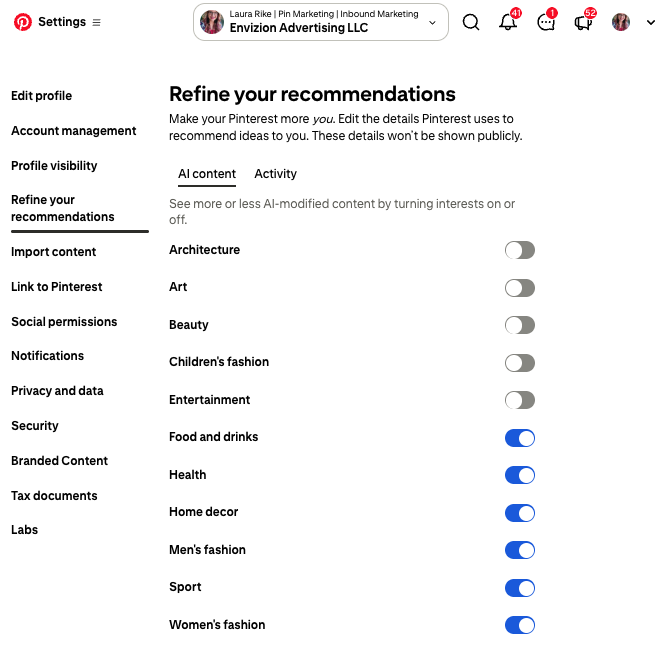
How to turn off AI images on Pinterest
This is the part my client asked for, so here it is. These settings only change what you see in your own feed. They don’t change how your business pins are shown to other people.
To see fewer AI images on desktop:
- Log in and click the options icon at the bottom left.
- Click “Refine your recommendations.”
- Open the “AI content” tab.
- Choose the categories you want to see less AI content in.
To see fewer AI images in the app:
- Tap your profile picture at the bottom right.
- Tap your profile photo at the top left.
- Tap “Refine your recommendations,” then the “GenAI interests” tab.
- Choose the categories you want to see less of.
Pinterest’s help page says this works on desktop and Android right now, with iPhone coming soon.
You can also stop Pinterest from using your pins to train its AI tool, called Pinterest Canvas. On desktop, click “More options,” then Settings, then “Privacy and data.” Uncheck “Use your data to train Pinterest Canvas” and click Save. If you’re under 18, Pinterest opts you out automatically.
What I think happens next
This part is my opinion, based on what my team and I see inside client accounts every week.
I think we’re heading into a season where AI filters and labels get stricter. Accounts that are pure AI will get pushed down, and some will get shut down completely.
I don’t think real faces will suddenly win. Faces have never done super well on Pinterest, and that probably won’t change.
I do think people will get sneakier. They’ll make AI images that look more real, with less of the obvious slop. And they still won’t get the traffic, leads and sales that accounts with a human behind every design get.
I also think we’ll hear a lot more people say their account got shut down or stuck in Pinterest’s spam filter, with no idea why. In a lot of those cases, they were leaning on AI so heavily that they were basically spamming the computer.
Your next step
Before you hire anyone for Pinterest management, ask them the same thing my client asked me: are you using AI on my pins?
If you want real photos, real designers and a real search plan behind every pin, that’s exactly what my team does with Pinterest management.
Pinterest is a search engine, and your people are already typing in what you sell. Your pins just need to be the book the librarian hands them.
Grab a 20-minute Pin Chat with me, and we’ll look at your Pinterest together. I’ll tell you what I see, and you can ask me anything about AI and Pinterest.
I’ll even turn the AI off in your feed for you. It takes about 30 seconds, which is roughly how long I can go without checking my to-do list.


