A founder who sells sauna accessories told me something this spring that I still think about. She had set up Pinterest for Shopify, connected her store, and walked away. Totally normal. Pinterest pulled in her product photos all on its own. She got about 5,000 impressions a month from it (impressions are how many times your pins showed up on someone’s screen).
“With zero effort, an additional five thousand impressions, it’s not bad,” she told me. “But I’m trying to understand what could it be.”
Such a good question!
Because 5,000 impressions from a catalog nobody touched is Pinterest doing the bare minimum.
Her products were on a shelf in the back of the store. Nobody had moved them up front where the shoppers walk.
That’s what Pinterest for Shopify looks like for most store owners. The app gets installed, the products sync, and then… not much happens.
This post is for Shopify store owners with products that already sell. Maybe you run the whole shop yourself. Maybe you already spend real money on Meta or Google ads. Either way, you want Pinterest to bring in buyers, and you’d love for someone else to run it.
By the end, you’ll know the nine things a good Pinterest manager should focus on. You’ll also know which numbers prove it’s working, and how long it takes.
What Pinterest for Shopify can do for your store
Pinterest works for Shopify stores because people go there to search for things to buy. Pinterest says 96% of its top searches are unbranded. Most people search for the thing they want, like “linen summer dress.” So a small shop can show up right next to a big brand. The Pinterest app for Shopify connects your products so shoppers can find them.
And there are a lot of shoppers. Pinterest reported 640 million people using it every month in mid-2026.
The job is getting your products on the right shelf, in front of the right ones.
1. Set up the Shopify connection the right way
This is the back room of your store, and it matters more than it looks.
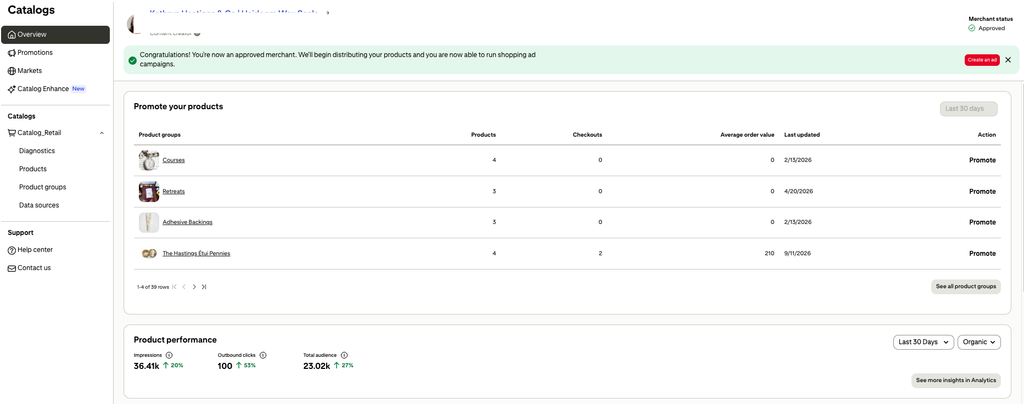
The Pinterest app for Shopify uploads your product catalog, updates it automatically every day, and installs the Pinterest tag. The tag is a tiny bit of tracking code. It tells you which pins led to add to carts and sales.
A good Pinterest manager doesn’t stop at “installed.” They check that the tag is tracking checkouts. They fix catalog errors. And they make sure your prices and stock match your store.
Try this: open your Pinterest catalog and look for errors or products that never showed up.
2. Apply for the Verified Merchant Program
This one is free, and a lot of stores skip it.
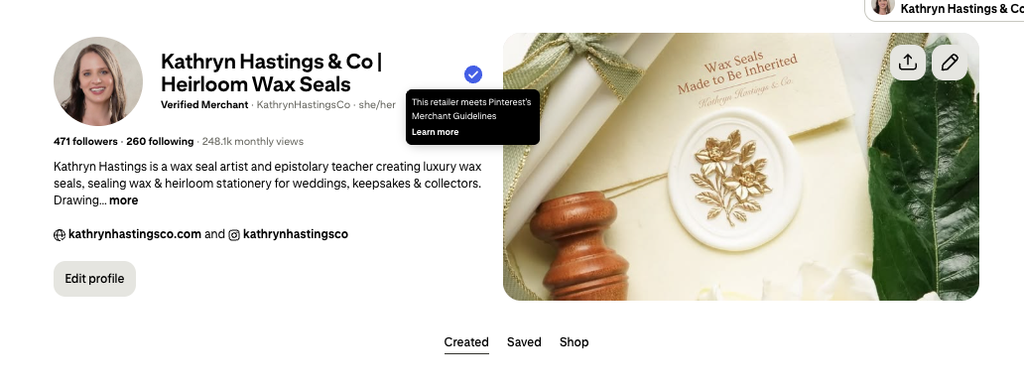
Pinterest’s Verified Merchant Program puts a badge on your profile and product pins. The badge shows shoppers that Pinterest checked out your brand. Verified stores can also show up in shopping spots, like the related pins under a product someone is already looking at. Free shelf space!
Your manager should apply for you once the catalog and tag are clean, so your store makes a great first impression.
Quick homework: ask your Pinterest manager if you’ve applied yet.
3. Turn your product names into search words
Your shop has cute product names. Pinterest has no idea what they mean.
“The Willow” might be your best-selling blanket. Adorable. But nobody types “the willow” into a search bar. They type “chunky knit throw blanket for the couch.”
A Pinterest manager‘s biggest job is finding the words shoppers really type. Then those words go into your pin titles, pin descriptions, and board names. Write descriptions in full sentences, the way a person would say it out loud. A pile of tags with commas between them works on Etsy. Pinterest reads sentences.
Do this today: pick your top five products and write down what a stranger would type to find each one.
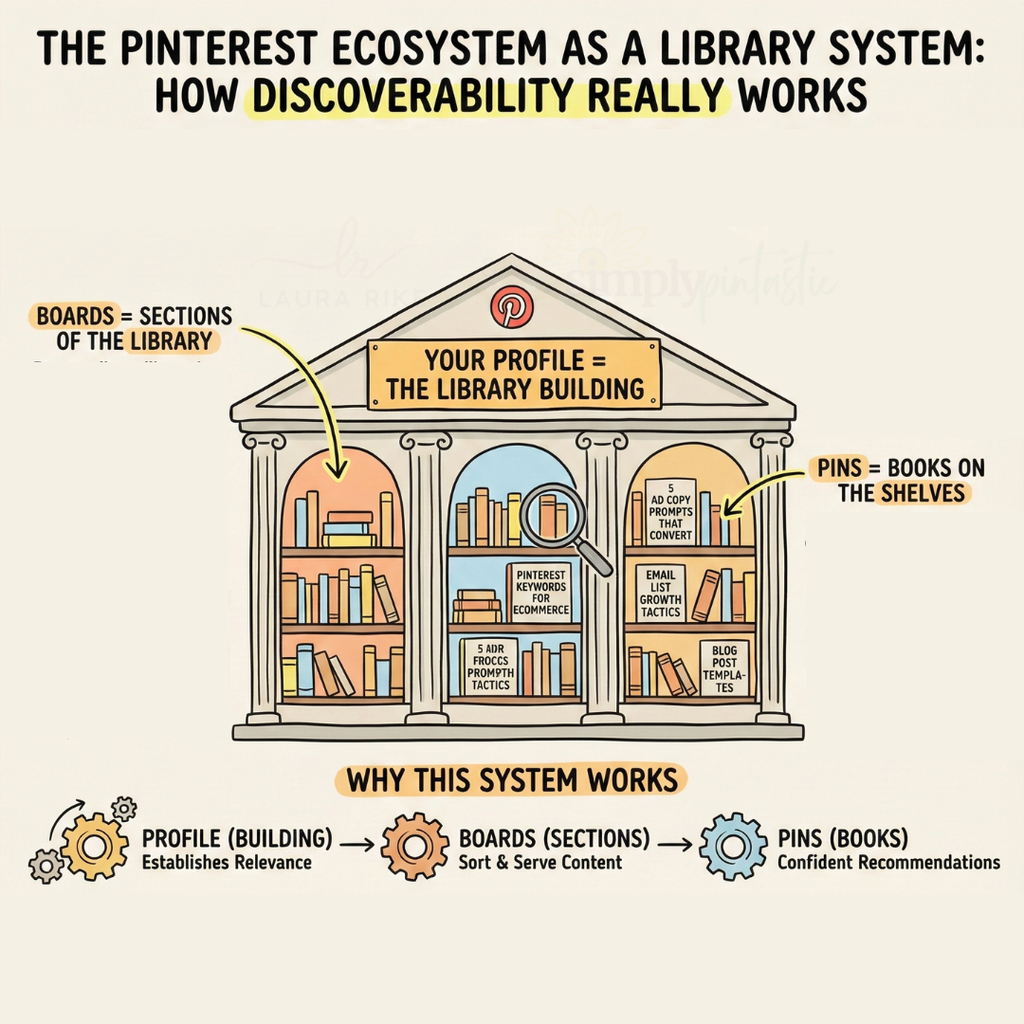
4. Name your Pinterest boards like shelves in a library
Boards are the collections your pins live in, kind of like sections and shelves in a library. Pinterest can show something they don’t understand what shelf it is organized on.
Pinterest reads your board names to decide what shelf to put you on. A board called “Our Faves” tells it nothing. A board called “Cozy Throw Blankets for the Living Room” tells it exactly which shoppers to show you to.
Think of every board as an aisle sign. Clear signs, happy shoppers.
Try this: rename any board that uses inside names, brand words, or cute puns to a name that Pinterest will know in the algorithm so that you are not trying to force reach with your pin and allow the HTML of the board to rank the pin and the users to find it via search.
5. Make pins that stand out from the white background crowd
The photo that sells in your shop is often the photo that flops on Pinterest.
Your clean, white background photo has one job on your product page. It helps a buyer decide things like… is this the right blue? How big is it really?
The person on Pinterest isn’t there yet. She’s still picturing it. A product floating on white gives her nowhere to put herself.
So your Pinterest manager should make pins that show the product in a real life. Here’s what stands out for product brands:
- Lifestyle pins that show the product being used, in a real room or on a real person
- Problem and solution pins, like “the blanket that stops the couch fight”
- Gift guide pins that group a few products for one type of person
- Collage pins that show a whole collection at once
- Short video pins that show the product moving, opening, or being worn
Make them tall (a 2:3 shape, like 1000 by 1500 pixels) with a few words of text that match what people search. And make several different pins for each best seller, since each one can show up for a different search.
Quick homework: pull your top seller and brainstorm three new pin ideas that show it in a real moment.
6. Point pins at collection pages when stock moves fast
Here’s a sneaky one.
Pins keep working for MONTHS. That’s the good news!
A boutique owner I talked with has inventory that sells out fast. If a pin points at one dress, that dress might be gone by the time the pin takes off. The shopper clicks, lands on a page that says “sold out,” sighs, and heads back to scrolling, and all those months of work just handed a ready buyer a closed door. Ouch.
So your manager should point those pins at collection pages instead. Think “floral summer dresses” or “boho living room decor.”
The collection page always has something in stock. Even when one item is gone.
Do this today: list the products that sell out often, and match each one to a collection page.
7. Stock the shelf before the season turns
Holiday shoppers start saving ideas long before they buy. Your pins need time to show up in search before that rush.
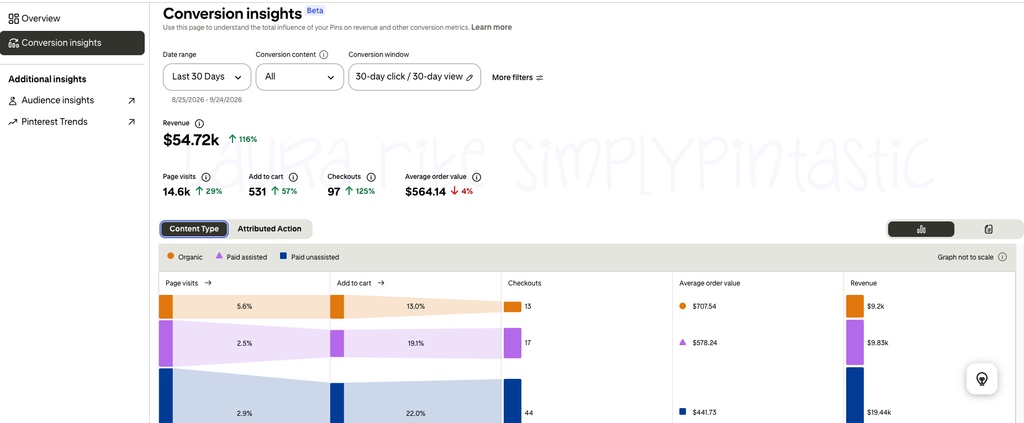
A Canadian Shopify store with big-ticket products I’ve worked with saw this during Black Friday week in 2024. Pinterest credited CA$37,670 in revenue to their pins that week, up 19% compared with the week before. Checkouts jumped 60%. The graphic below is from early 2026: ALL ORGANIC PINTEREST MANAGEMENT within 30 days!!!
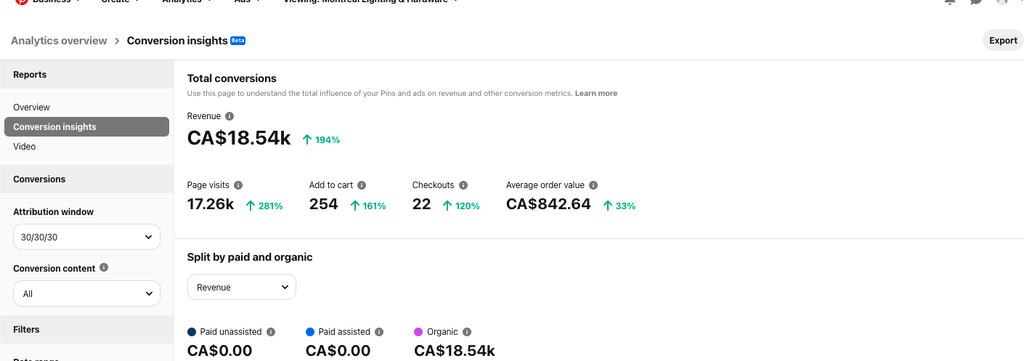
What a month.
That kind of week gets built in the fall, weeks before the sale starts.
Try this: ask your manager for a season plan that shows when your holiday pins go live.
8. Add ads on top of the organic foundation
Organic pins (the free ones) build the shelf. Ads push shoppers to it faster.
Pinterest says Top of Search ads get a 29% higher click rate on average than standard campaigns. And when people shop on Pinterest, 45% of clicks happen in the top ten search results. Being near the top matters.
Here’s what it looks like with real stores.
Mira, a beauty and wellness brand on Shopify, pulled in $49,000 to $93,000 a week in Pinterest revenue over 15 weeks. Their return on ad spend held between 4.2x and 6.7x the whole time. That’s ROAS, or the dollars back for every dollar spent on ads.
A premium body care brand is under NDA, so no name. They used to pay $186.70 to win each new customer from Pinterest. One quarter later, it cost $27.98. One week in March 2026, their pins brought in $33,377 on $7,150 in ad spend. Their average order grew from $72.81 to $80.71, too.
A good manager also re-targets people. Those are shoppers who visited your store from Meta or Google and left without buying. Pinterest can catch them again while they’re still deciding.
Quick homework: once your organic pins are working, test a small ad budget on your best seller.
9. Track the numbers that tie to sales
Pretty numbers can fool you. Impressions feel great, and I love a big number as much as anyone!
But your Pinterest manager should report on the numbers that tie to money. That means outbound clicks, add to carts, checkouts, revenue, and average order value. (Outbound clicks are people who left Pinterest to visit your store.)
Daily Dose, a super-food brand on Shopify, used organic Pinterest only, with zero ad spend. In 60 days, their add to carts from Pinterest went up 666%. Checkouts went up 300%. The dollar amount was still small, $485 in revenue, because they were early. The shoppers were showing up, and the sales were following them.
That Canadian store tells the other end of the story. In one month, Pinterest credited them with CA$96,390 in revenue, with an average order of about CA$800.
One more rule I give every product seller. If your impressions climb but your clicks stay flat, hold off on making more pins and fix the ones you have first. People are seeing them and choosing something else.
Do this today: ask for a monthly report that shows add-to-carts, checkouts, and revenue from Pinterest.
How long Pinterest takes for a Shopify store
Pinterest grows slower than ads at the start. Then it keeps going.
Pinterest runs on a longer clock than your ads. And that’s my favorite part.
A Meta ad stops working the day the budget stops. A pin stays on the shelf. The pin you make in March can still be sending shoppers to your store in November.
Look at that Canadian Shopify store across one year. In January 2024, Pinterest credited them with CA$96,390 in revenue. In June, it was CA$64,340. Then Black Friday week alone brought in CA$37,670.
Same shelf. Same store. Sales showing up in every season of the year.
Mira shows what steady looks like. For 15 weeks straight, Pinterest brought in somewhere between $49,000 and $93,000 every single week.
Daily Dose shows what the early chapter looks like. Sixty days in, add to carts were up 666% while revenue was still $485. The shoppers show up first… and the sales stack up behind them.
So I check in on Pinterest at month 3, month 6, and month 12.
Around month 3, you’re looking for the right shoppers finding you: outbound clicks and add to carts climbing. By month 6, you want to see checkouts and revenue you can point to in your reports. By month 12, the pins from your first season are still working while new ones stack on top, and Pinterest starts to feel like part of your store.
Where your store fits right now
If you run a smaller shop and do all the marketing yourself, start with steps 1 through 5. Those are the foundation. A manager can take them off your plate so you can get back to making and shipping.
If you’re an established brand already running Meta or Google ads, steps 7 through 9 are where the big wins live. Pinterest becomes a second sales channel that keeps working after the ad budget stops.
Both stages need the same shelf built first.
Your next 3 steps
Here’s the short version:
- Check that your Shopify catalog and Pinterest tag are working
- Rename your boards and pins with the words shoppers really type
- Ask for a report that tracks add to carts, checkouts, and revenue
Pinterest is a search engine for shoppers. When your products sit on the right shelf, they get found by people who are already looking for them, month after month.
If you’d love someone to build that shelf for you, here’s how my Pinterest management for e-commerce works. Or grab a Pinterest Pin Chat. It’s 20 minutes, I open your Pinterest, and I tell you what I see.
Fair warning, I will probably get more excited about your product catalog than you are. It’s a whole thing.


